A Practical Guide to SharePoint 2013

A Practical Guide to SharePoint 2013
A Practical Guide to SharePoint 2013 - Book by Saifullah Shafiq

Wednesday, May 20, 2009

Small SPQuery tip (How to get rid of "Cannot complete this action" error)

You try to run an SPQuery and get a "Cannot complete this action" error. I have seen users who think it's a permissions issue and they try to use elevatedprivileges. Remember, if you get this error when running an SPQuery object,the first thing you should look for is the query itself.  Because of a small semantical mistake the query will not run and SharePoint will throw this error. These mistakes are often difficult to locate with eye. I'd suggest use a tool, such as U2U CAML builder, to construct queries. Here is an example:
 string sQuery =
                   "<BR /><Where>" +
                    "<And>" +
                      "<Eq>" +
                         "<FieldRef Name='Title' />" +
                         "<Value Type='Text'>" + sDocumentName.ToString().Trim() + "</Value>" +
                      "</Eq>" +
                      "<Eq>" +
                      "<FieldRef Name='fc5bb16d_x002d_5336_x002d_45a6_x002d_b6e5_x002d_0c9e8de73e26' />" +
                         "<Value Type='Text'>" + sActivity + "</Value>" +
                      "</Eq>" +
                    "</And" +
                   "</Where>";
This query looks fine when you see it and it should run but it won't run because it has a small error.  If you notice the closing AND tag, you'll the closing angular bracket is missing. The query will compile but SharePoint will throw an error. The "</And" should have been "</And>".



Friday, May 1, 2009

FAST and SharePoint

This blog post contains good information about SharePoint and FAST. True, there are not many blogs (developer's perspective) at the moment that are discussing this topic but it's gonna be a popular topic very soon (6th sense?).

Thursday, April 30, 2009

SharePoint Saturday DC: Live Blogging

Hi Friends,
April 30 - 11:10 AM: I will be at the SharePoint Saturday DC on May 2nd. I will do live blogging and will try to cover as  many sessions as possible. I have setup a flickr account for this event:
In the window below, you will see live commentry, comments from readers and poll questions. If you have any comments, feel free to write to me. If you want me to cover any particular sessions, let me know. The list of sessions is available at: http://www.sharepointsaturday.org/dc

Note: I will be blogging live, excuse lapses of grammar, spelling errors, and typos. 


April 30 - 11:51 AM: Just noticed that sharepointblogs.com does not support iFrame in a blog post. The live commentry window does not appear in this post. I have setup a new page for the live blog. URL is as following:
Or If you prefer, you can open a new window (pop-up) that will show commentry directly on the host site:
Click Here to open a new window.
Thanks,
Saif
 Update: May 2, 2009 - 10:46 PM: It was a wonderful day. I enjoyed excellent sessions and met interesting people. The crowd was simply awesome. Met Joel Oleson, Paul Galvin, Mark Miller, Dux Raymond Sy, Michael Lotter,  Chad Scroeder, Sahil Malik, Becky Isserman amongst others.  I simultaneously blogged on two sites. I had already sent an invite to my user group members and later came to know that Mark Miller had also arranged a live blogging event. So I blogged for both, my site and Mark Miller's endusersharepoint.com. Also, remained active on twitter. I have posted pictures on flickr (See URL above). To view live blog visit following sites:
I will post a detailed event report tomorrow. Well, I will definitely try to write something but not sure. We will see tomorrow! It's good night from me. Thanks to Dux Raymond Sy and Reah Sy, who did an excellent job of organizing the event. Thank you guys!
-Saif

Thursday, March 12, 2009

Explorer view in big libraries does not load

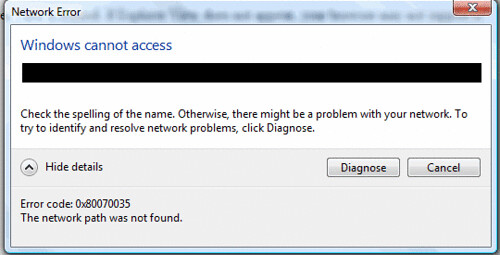
Explorer view in big libraries, that have huge number of documents, does not load. It gives you following error:

After some time, you get the following network error:


Tuesday, March 10, 2009

Error: File not found

File not found
I got this error second time in two months so I thought I would share my experience with the readers. As you may know, there could be several reasons for this error. If you google internet for this specific SharePoint error, you will find a couple of posts discussing the issue:
As you will notice in the above two posts, in both cases the cause of the error was different. In one case, it was related to web part. In other case, it was related to a misplaced CSS file. In my case, the problem was due to low disk space in system drive. Interesting? I checked IIS, sites were running. Checked DB! Databases were up! I created and tested a WSP on my server before the error appeared on my server. I retracted and deleted the WSP although I was sure it had nothing to do with the error. Then I noticed, my server was performing slow. Checked processes, they were ok. Checked for virus. No virus found! In the end, I noticed the server was slow because it had run out of space on system drive. I freed up some space and SharePoint sites started working. I thought I would share this with my blog readers. If you see this error next time, don't forget to check space on your system drive.

10 Best Practices For Building SharePoint Solutions

Some tips about writing testable code and deploying SharePoint solutions!

MVP Renewed for another year!

Just got an email from Microsoft that my MVP award has been renewed for another year.  Congrats to everyone who got renewed and to all the new MVPs!